Y2Linux 1.0 Beta 9.3.15: the Quick Menu
Release 1.0.0-beta.9.3.15, Y2Reborn 1.0.0-beta.9.3.15, kernel 6.18.56-y2linux-1.0.0-beta.9.3.15, update sequence 14800, root 2026.08-platform-v1.246. Published as GitHub release baseline-223 (test build 223). Previous release: Beta 9.3.13. Version 9.3.14 (test build 222) was the same menu as a plain list on the developer's player and was never published.
This report is written for people who use the player. A short technical appendix is at the end.
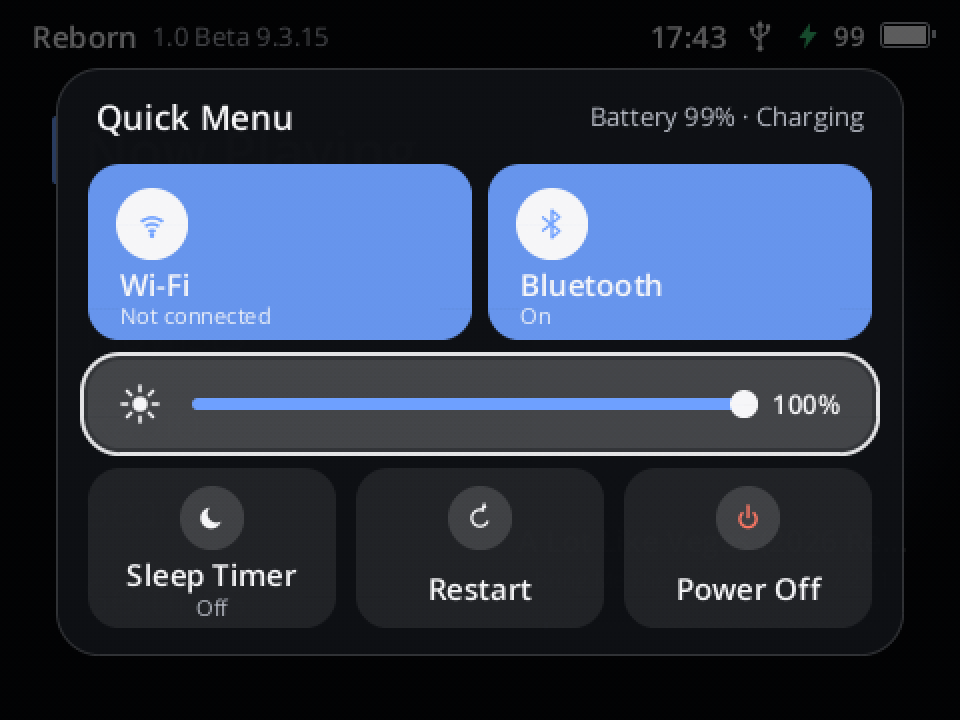
The Quick Menu on the player (screenshot of test build 223)
In one paragraph
Hold Power on any screen and the Quick Menu opens (Y2Linux #85): Wi-Fi and Bluetooth on or off, the screen's brightness, the sleep timer, Restart and Power Off, without walking into Settings. It is a panel of tiles in the middle of the screen that grows in over the dimmed screen; the focus glides from tile to tile as you turn the wheel. Holding Power still turns the player off: keep holding and a ring fills around the Power Off tile.
How to use it
- Hold Power (about two thirds of a second) on any screen, also with the screen off. Let go: the menu stays.
- Turn the wheel to move: Wi-Fi → Bluetooth → Brightness → Sleep Timer → Restart → Power Off. It opens on
Brightness.
- Wi-Fi / Bluetooth: Select switches it on or off; the tile is coloured while it is on and names the network
or the headphones.
- Brightness: Select, turn the wheel (the screen follows), Select again.
- Sleep Timer: opens the timer's choices. Restart and Power Off act at once (not while an update
installs).
- Close with Back or a short press of Power.
- Turn off without looking: keep holding Power. After 3 s a ring fills around Power Off and the player turns off
1.2 s later. Holding Power for 10 s still resets a player that does not answer at all.
Every skin shows the same panel in its own colours. Everything in the menu is also where it always was in Settings.
How it was tested
- Before release: the platform's full check, Reborn's workspace tests (new tests: the hold opens the menu,
release keeps it, a short press closes it, a long hold turns the player off once, the keyboard keeps the old ring; the tiles' order and values, the switches, brightness, the sleep timer, Restart and Power Off waiting while an update runs) and the 552 tests of the release images.
- Pictures: the panel, brightness adjusting and the ring were checked on host renders in Reborn's own look and
in Bunny Bow, Terminal and Classic (Terminal's lit tiles needed dark text).
- On a player: test build 223 on the developer's player: installed by update, the menu opened from Home by a
hold and closed again; the screenshot above is from the player.
Updating
Settings → System → Software Update → Update Now. Your music, playlists, settings, Wi-Fi networks and Bluetooth pairings stay. Restore Previous System (Settings → System → About, tap Version seven times, then Diagnostics) goes back to the version you had.
Known issues
Everything listed for Beta 9.0 and Beta 9.3.13 still applies.
- Back in the sleep timer's choices closes the menu instead of returning to it.
- If you were used to holding Power to turn the player off, it now takes about 4 s instead of 2 s (or pick Power Off).
Technical appendix
- Reborn
crates/reborn-ui/src/quick_menu.rs(power_held, rows, actions,close_quick_menu;QUICK_MENU_HOLD3 s)and
views_quick.rs(the panel:ui.motion.easespringsquick.*for the grow-in, the focus frame, the tiles' fill and the brightness level; fade-out after closing; the hold ring on the Power Off tile; skins draw it remapped to their palette).Modal::QuickMenuis not saved with the session.power_holdis now the instant the ring starts. Brightness reuses the Display card'sadjusting_brightness. - The input layer is unchanged: Power's long press is still
PowerHold, its releasePowerHoldCancel. - Linux
e9bcdee5(built), Reborne2555d2(built); work commits Rebornf78c7ae,0df540a, Linux507d60c9. Settings map: Reborndocs/ui/REBORN-SETTINGS-MAP.md"The Quick Menu (hold Power)".