Y2Linux 1.0 Beta 9.3.15: the Quick Menu. Linux 6.18 and the native Reborn music player for the Innioasis Y2.
Already running Y2Linux
Settings → System → Software Update → Update Now (on Beta 9.2.8 and older: Settings → About & Updates → Check for Updates → Update Now).
What changed
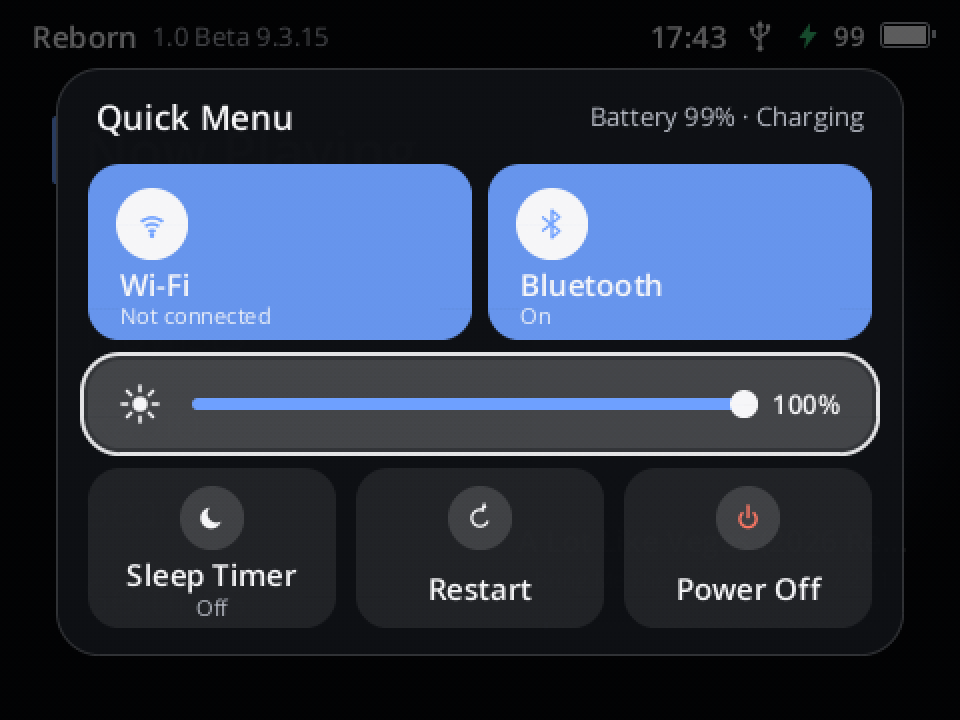
Hold Power on any screen and the Quick Menu opens (#85): Wi-Fi and Bluetooth on or off, the screen's brightness, the sleep timer, Restart and Power Off, without going into Settings.
- A panel of tiles in the middle of the screen; it grows in over the dimmed screen and the focus glides from tile to tile as you turn the wheel. Let go of Power and it stays; Back or a short press of Power closes it.
- Brightness: Select, turn the wheel, Select. Wi-Fi / Bluetooth: Select switches them; the tile is coloured while on. Restart / Power Off act at once.
- Still turns off when held: keep holding Power and a ring fills around Power Off; the player turns off after about 4 s (it was 2 s).
- Every skin shows the panel in its own colours.
Before release: the platform's full check, Reborn's workspace tests (new ones for the menu) and the 552 tests of the release images; the panel checked on host renders in four looks and on the developer's player. Version 9.3.14 was an unpublished test build; everything from Beta 9.3.13 is included.
What changed and why, in plain words: Beta 9.3.15 report.
Install (from stock)
You need SP Flash Tool v5.2032, a USB cable, Y2Linux-1.0.0-beta.9.3.15-first-install.zip below and the Innioasis Y2 firmware package v3.2.0 from Innioasis (only this version works; it is also your way back to stock).
- Unpack both.
- SP Flash Tool → Download Only → load
MT6582_Android_scatter.txtfrom the Y2Linux zip. Exactly BOOTIMG, RECOVERY, ANDROID and USRDATA are ticked. - Click Download and connect the switched-off Y2; wait for the green tick.
- Unplug and press Power: the player sets up its Internal Storage (a few seconds), then Y2Linux and Reborn start, music works.
- Connect the Y2 to the computer and copy (don't move)
system.imgfrom the Innioasis package into the Firmware folder on Internal Storage. The player takes the Wi-Fi/Bluetooth firmware from it and turns the radios on.
Full guide: INSTALL · How updates work: Recovery and updates · Storage: Storage · Audiobooks · Headphone settings: Headphone output · Error reports · Skins: skin guide
Known issues (beta)
- After a sleep (a pause longer than 15 minutes, or the Power button) the Bluetooth link ends; the player reconnects within a few seconds of waking. Buds that have gone back to a phone meanwhile must be picked again in Settings → Bluetooth.
- WPA3-only and Enhanced Open Wi-Fi networks can't be joined (hardware); ask for "WPA2/WPA3 mixed" where you can. A router that keeps refusing the player (#83) is still being worked on.
- Everything listed for Beta 9.0 still applies. If anything behaves differently from 9.3.13, send an error report (Settings → System → Error Reports); Restore Previous System (Settings → System → About, tap Version seven times, then Diagnostics) goes back to the version you had, with your data kept.
- Battery life in sleep: about 2 mA overnight on the developer's player (estimated from the battery voltage); stock is about 1.3 mA.
- Some players turned off by themselves during playback; the cause is not found yet. If yours does, start it again and send a report.
- The speaker uses the same volume as the headphones; its loudest step is the stock speaker's. Start low the first time.
- BBC radio stations stream only in HLS, which the player does not play yet. FM radio is in the works for a later beta.
Files
Y2Linux-1.0.0-beta.9.3.15-first-install.zip: images, scatter files and checksums for SP Flash Tool. The data image has no SSH key (developers:tools/production/first_owner.py).manifest.json,manifest.sig,rootfs.ext4.gz,bootimg.img.gz,recovery.img.gz: the signed over-the-air update (Ed25519 keyplatform-v1-release-20261015, sequence 14800).Y2Linux-1.0.0-beta.9.3.15-sources-buildroot-legal-info.tar(licences, manifests, this project's packages) and the third-party, toolchain and Linux sources linked below: corresponding sources. Our own code: Y2Linux and Y2Reborn at tagbaseline-223. The speaker amplifier driver is Chris Hendrickson's GPL-2.0 AW87559 driver. The headphone profiles are AutoEq results (MIT, Jaakko Pasanen); their licence ships with them.SHA256SUMSfor the attached files.
Beta software: use at your own risk. Not affiliated with Innioasis, MediaTek, Awinic, Last.fm, AutoEq, Strawberry or Google. Noto Sans CJK is licensed under the SIL Open Font License 1.1. Details: Beta 9.3.15 report.
Sources unchanged since an earlier release
Y2Linux-sources-third-party-d665a5f06500.tar(attached tobaseline-220), SHA-256d665a5f065004ae5d56bd8ed75f2ad0af8f9a040db9f171ffc6044cb348cf8f3Y2Linux-sources-toolchain-f7cda4c7d213.tar(attached tobaseline-120), SHA-256f7cda4c7d2134bed15dacc7afd7e1687621a57412d60e49c725efc3880bf1bc6linux-6.18.56.tar.xz(attached tobaseline-120), SHA-2564633bbda2ab95eaf2a7af4041236451d6759c72e6946265531af4b3aacefbf89