InniClassic





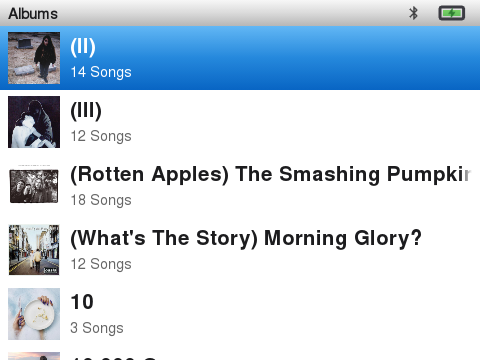
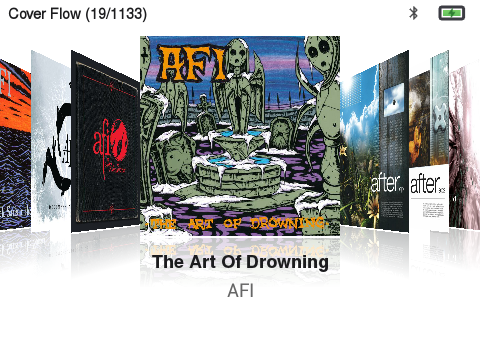
InniClassic is a launcher for the Innioasis Y1 built directly on top of and based on ismileblue/y1_launcher (JJ Launcher / MO-ON Launcher) — all credit for the original launcher, media engine, and theme system goes to that project. The goal of InniClassic is to turn JJ Launcher into as close to the original iPod Classic experience as possible, while going beyond it where it makes sense (FM Radio, Podcasts, Video, a from-scratch Music Quiz).
This is not a GitHub "Fork" in the technical sense (it's a separate repository), but it is built directly on top of JJ Launcher's source and stays close to upstream so future JJ Launcher releases can keep being merged in.
[!WARNING] Currently only tested and available for the Innioasis Y1. The Method 1 ROM ships Y1 Firmware 3.1.2; the standalone APK (Method 2) has also been verified on device System Software version 2.1.9 — check your own firmware version before installing anything below.
Screenshots
| Main Menu | Now Playing | Music |
|---|---|---|
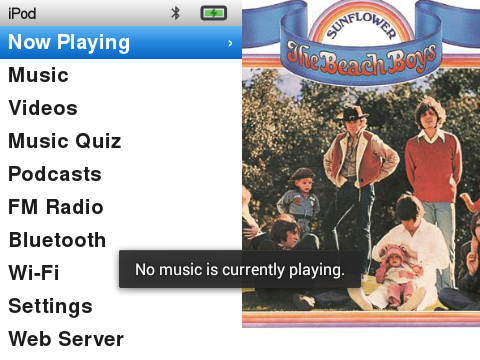 | 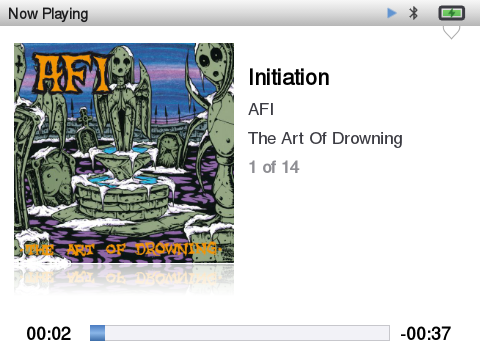 | 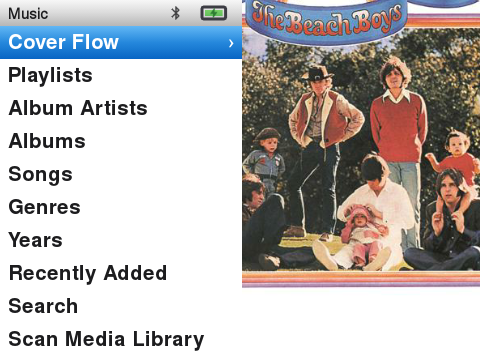 |
| Artists | Album View | Cover Flow |
|---|---|---|
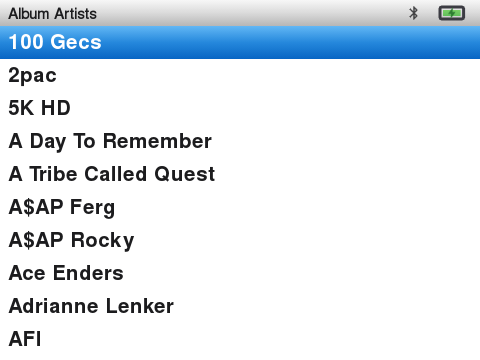 |  |  |
Features
The iPod Classic experience
- Bundled iPod Classic theme (light + dark variant), aiming for a 1:1 look: plain-text menu lists, real system-matched bold typography, tight iPod-accurate spacing, and a status bar that shows the current screen's name instead of a clock
- Two-pane Main Menu and Music menu, both sharing the exact same look and behavior: menu list on the left, a slowly panning ("Ken Burns") album cover on the right that bleeds all the way to the top of the screen, behind the status bar
- Redesigned Now Playing screen — large angled album cover with a reflection underneath (toggleable via Album Cover Tilt), a glass-look progress/volume bar, and a scrolling marquee for titles too long to fit
- Center-click on Now Playing cycles Progress → Seek → Shuffle & Repeat → Rating, inspired by the iPod Classic (the wheel previews a seek position in 5-second steps, cycles shuffle/repeat, or sets a star rating depending on the state; volume control otherwise)
- Confirm seeking — in Seek mode, turn the wheel to choose a position, then press Center to apply it and return to Progress. Without turning the wheel, Center continues through the other display modes.
- Key lock — hold Center for 0.8 seconds to lock; hold Center again to unlock. A short Center press selects items or cycles Now Playing modes.
- On-The-Go playlist and a Now Playing hold-menu (long-press Play/Pause): Add/Remove Favorite, Add to On-The-Go, Browse Album, Browse Artist, Toggle Visualizer (song rating is set from the bottom-bar Rating mode instead — see above)
- Synced lyrics — "Toggle Visualizer" swaps the spectrum analyzer for a scrolling, time-synced lyrics view whenever lyrics are found for the current track: an external
.lrcfile next to the song (same filename), or embedded lyrics (ID3USLTfor MP3, FLAC/ALAC tags) — synced if they contain[mm:ss.xx]timestamps, otherwise shown as plain scrolling text - Favorites with a heart indicator on Now Playing (hollow when not favorited, filled red when it is)
- Fast-scroll letter jump on every alphabetized list, like spinning a real click wheel
- A from-scratch recreation of the classic iPod Music Quiz using your own library, 5 rounds of 8 questions with round-complete and victory screens
Music library
- Artists, Album Artists, Albums, Songs, Genres, Composers, Playlists, Favorites — Artists groups by the literal track artist tag (so features/collaborations show up individually), Album Artists is the traditional grouped view
- Wide format support: MP3, FLAC, WAV, OGG Vorbis, Opus (including
.ogg-extension Opus files), ALAC/M4A, AAC - Gapless playback for albums and playlists of 15 tracks or fewer (see Known limitations)
- Shuffle row pinned to the top of All Songs, matching stock Y1 firmware
- Cover art: use at least 600×600, ideally 1000×1000 or larger — the Main Menu and Music menu covers pan slowly ("Ken Burns") across a panel that's rendered close to full screen height and then overscanned further for the pan itself, so anything smaller (e.g. 300×300) looks visibly soft/blurry once it's stretched and moving. Embedded cover art (ID3/FLAC/ALAC tags) and folder
cover.jpg/folder.jpgare both supported. - Last.fm scrobbling — every track you play past the halfway point (or 4 minutes, whichever comes first) is automatically appended to a local
.scrobbler.logat the root of your SD card (Audioscrobbler 1.1 format, same idea as Rockbox) — no setup, no account, works out of the box. To also send scrobbles to a real Last.fm account, turn on Settings → Sync Scrobbles to Last.fm and log in via Settings → Last.fm Account through a browser-based flow (the device shows a URL/QR you open on your phone or PC, since typing credentials with a click wheel is painful) — scrobbles queue locally and get sent once you're logged in and online. Note.scrobbler.logstarts with a dot, so it won't show up in file managers/apps that hide hidden files by default.
Beyond music
- Podcasts — subscribe, stream, download for offline listening
- FM Radio — talks to the real hardware tuner directly, no need for the stock radio app
- Video playback — a dedicated Videos folder on the SD card, full-screen playback with wheel-driven volume and Previous/Next seeking (10 seconds), powered by libVLC for stable, correctly-synced playback. The Videos list shows a real thumbnail per file, playback remembers where you left off, and Settings → Fill Video Screen lets you choose between preserving the original aspect ratio (letterboxed) or filling the whole screen (see Known limitations)
- Audiobooks — bookmarked, resumable playback
- Wireless PC Upload — a small web server for copying music onto the device over Wi-Fi, no cable needed
Installable two ways
- Flashable ROM (
rom.zip) via the Innioasis Updater — no ADB required - Standalone APK for updating an existing install
Under the hood
- A round of crash fixes for library browsing (Artists/Albums/Genres), FLAC playback, and the backlight timer not resetting during active use
- Debloated further — a number of never-used stock Android/MediaTek system apps (Exchange sync, live-wallpaper demos, SIM toolkit, text-to-speech, etc.) can be safely disabled to free up RAM and reduce background CPU/battery use
- Reduced background CPU wake-ups: the Now Playing progress ticker and the clock/widget refresh loop used to keep doing full work every 500ms–1s even when their screen wasn't visible (or the display was off) — both now sit idle unless actually needed
Known limitations
- Gapless playback only activates for playlists of 15 tracks or fewer, with shuffle off and no FLAC files in the queue. FLAC decoding runs on a separate legacy engine that can't share ExoPlayer's native queue, and very large/shuffled queues (e.g. "All Songs") intentionally keep using the older, proven per-track loading path.
- Video playback now uses libVLC rather than ExoPlayer, after finding that ExoPlayer's precise frame-timing API doesn't exist before Android API 21, and its fallback for older devices is effectively broken on the Y1's API 17 (audio stayed in sync, but picture played back many times faster than real time). Playback is stable now. For smooth playback, keep source files modest — 640×480, 30fps, ~2 Mbps or less (see
tools/handbrake_y1_preset.jsonfor a ready-to-import HandBrake preset).
Installation
There are two ways to get InniClassic onto your Innioasis Y1. Method 1 is recommended for most people — it's a single flash and there's nothing else to install or uninstall afterward.
Method 1: Innioasis Updater (recommended)
The ROM package installs the latest Y1 Firmware 3.1.2 with InniClassic already baked in as the system launcher — no ADB, no manual uninstall step, nothing else to do afterward.
- Download
rom.zipfrom this repo's Releases page — the Innioasis Updater expects this exact filename, so keep it as-is after downloading. - Open the Innioasis Updater, select that zip as a local firmware file, and follow the on-screen instructions.
- Once it finishes and the device reboots, InniClassic is the active launcher — nothing further to install.
[!WARNING] Flashing firmware always carries some risk. Make sure the device stays connected and powered throughout the flash, and don't interrupt it.
Method 2: Install just the APK over an existing JJ Launcher setup
Use this if you already have JJ Launcher running (via the stock firmware or Method 1's ROM from an earlier version) and just want to update the app itself.
- Uninstall the existing launcher app first — this step is required, not optional (see why below):
`bash adb uninstall com.themoon.y1` If that fails because it's baked into your firmware image as a system app, use this instead:`bash adb shell pm uninstall --user 0 com.themoon.y1` - Connect the device to your PC and download the latest
InniClassic-<version>.apkfrom this repo's Releases page. - Install it:
`bash adb install InniClassic-.apk` - (Optional, only if Bluetooth pairing ever asks for a permission you can't grant from the UI):
`bash adb shell pm grant com.themoon.y1 android.permission.WRITE_SECURE_SETTINGS`
The local .scrobbler.log works automatically with no setup. To also sync scrobbles to a real Last.fm account, turn on Settings → Sync Scrobbles to Last.fm and log in via Settings → Last.fm Account through the browser-based flow (the device shows a URL/QR you open on your phone or PC). To use a custom theme other than the bundled iPod Classic one, see JJ Launcher's original theme documentation.
Replacing the stock JJ Launcher app
(This only applies to Method 2 — Method 1's ROM already ships with InniClassic pre-installed, so there's nothing to replace.)
Both InniClassic and the stock JJ Launcher use the same package name (com.themoon.y1), but InniClassic's release APKs are currently debug-signed (see Building it yourself — there's no shared release keystore yet). Android refuses to install an APK over an existing app if the signing certificate doesn't match, so skipping the uninstall step above and just running adb install -r will fail with:
Failure [INSTALL_FAILED_UPDATE_INCOMPATIBLE: ... signatures do not match]or on older Android versions:
INSTALL_PARSE_FAILED_INCONSISTENT_CERTIFICATESThat's why the uninstall step above always comes before installing — there's no way around it as long as InniClassic ships debug-signed builds.
What you keep, what you lose: uninstalling only clears the app's private settings (app-internal preferences like toggles and any saved Last.fm session — you'll need to log in again). Your music library, themes (/storage/sdcard0/Y1_Themes), and the .scrobbler.log all live on the SD card, outside the app's private storage, so they're untouched and picked up again automatically on first launch.
Speeding up large library scans
InniClassic caches your scanned library to a plain JSON file at the SD card's root (.y1_library_cache.json); any file already listed there is skipped during the next scan instead of being re-tagged. If you have a large library (thousands of tracks) and add music on your PC, tools/build_library_cache.py pre-builds that same cache file on your PC — much faster than the device's CPU — so the next on-device scan is just a quick existence check instead of tagging everything from scratch.
Requires the card to be accessible as a normal drive (card reader or USB mass storage, not MTP) and pip install mutagen:
python3 tools/build_library_cache.py /path/to/sdcardRun it any time after copying new music over, before putting the card back in the device.
Building it yourself
Last.fm requires every client to use its own API credentials, so none are shipped in this repository. To build from source:
- Register a free API account at last.fm/api/account/create.
- Add these two lines to your own
local.properties(already gitignored, never committed):`properties lastfm.api.key=YOUR_KEY lastfm.api.secret=YOUR_SECRET` - Build as usual (
./gradlew assembleDebug). Without a key, the app still runs fine — scrobbling simply won't authenticate.
What's different from upstream JJ Launcher
For anyone tracking this project against ismileblue/y1_launcher: everything in Features above was added or substantially changed on top of JJ Launcher. Anything not mentioned there (media scanner internals, EQ, Bluetooth pairing, Wi-Fi keyboard, the custom theme engine, etc.) still works as in the original project — see upstream's documentation for that.
Credits & License
- Based on ismileblue/y1_launcher (JJ Launcher / MO-ON Launcher) — all credit for the original launcher, media engine, and theme system goes to the original author.
- The bundled iPod Classic theme's system font is Nimbus Sans (URW++), a free, metric-compatible alternative to Helvetica.
- Distributed under the same license as upstream — see LICENSE (free for personal/educational, non-commercial use).
If InniClassic's useful to you, you can buy me a coffee — totally optional, never required.
See CHANGELOG.md for the full version history.