
This fork exists for OTA updates from old clients. Use ClassyPlayer/Classy
Classy



Classy is an iPod Classic-style launcher and media player for Innioasis Y1 and Y2 portable audio players, based on InniClassic by FabianZettl/inniclassic and ismileblue/y1_launcher. It recreates the classic click wheel interface while adding features like hardware FM radio, podcasts, video playback, and a library-based Music Quiz.
Screenshots
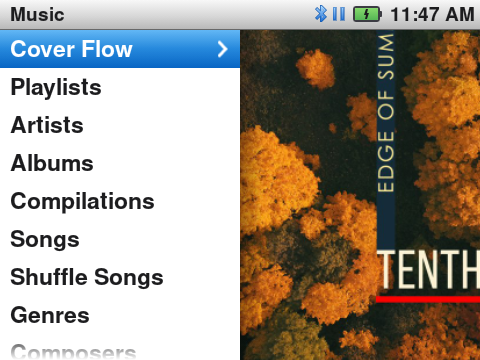
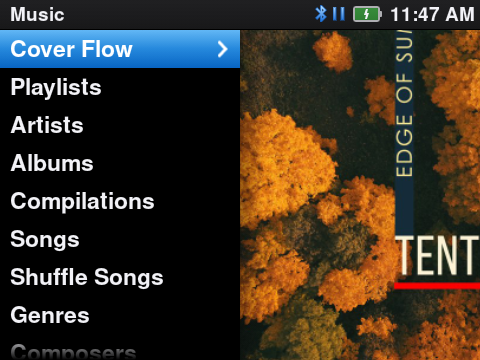
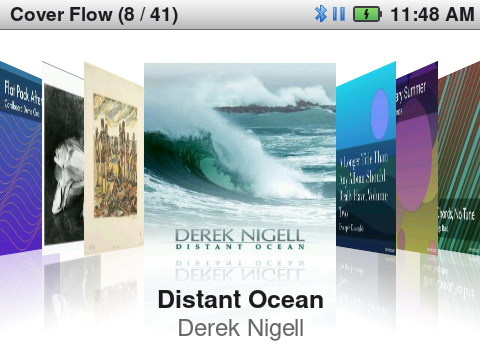
| Music (Classic Light) | Music (Classic Dark) | Cover Flow |
|---|---|---|
 |  |  |
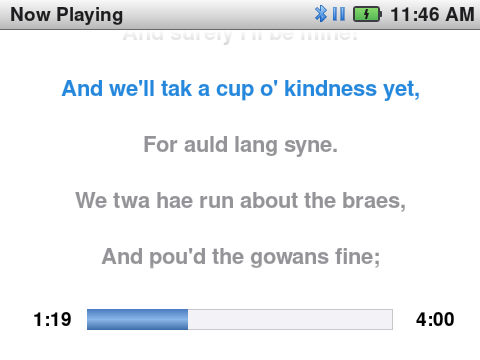
| Now Playing (Classic Light) | Now Playing (Classic Dark) | Synced lyrics |
|---|---|---|
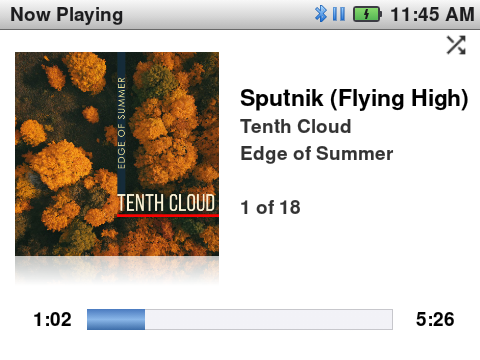 | 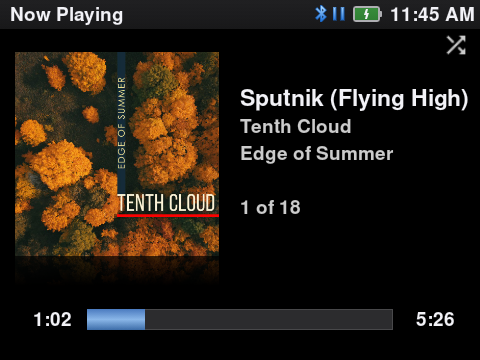 |  |
The album covers in the screenshots are from Creative Commons albums, for example Edge of Summer by Tenth Cloud (CC BY-SA 4.0; photo Anatoliy Laptev, artwork Anna Riet). The credits and the licence of each album are at the end of site/index.html, in Music and covers in the screenshots.
Features
The iPod Classic experience
- Classic Light and Classic Dark themes with the iPod Classic proportions: a 30 px status bar, 38 px rows with a drawn chevron, and Nimbus Sans text. With Settings > Theme > Auto, Classic Light shows from sunrise to sunset and Classic Dark shows at night. A theme change applies immediately, without a restart.
- iPod status bar: the screen title, a clock, Wi-Fi, Bluetooth and headphone icons, and a battery with optional percentage digits.
- Two-pane Main Menu and Music menu sharing the same layout: menu list on the left and a slowly panning and zooming album cover on the right (Menu Cover Motion).
- Menus slide in from the right and go back out to the left, as on the iPod. When Cover Flow or Now Playing opens, the list pane and the cover pane move apart.
- Questions, notices and progress show as iPod screens, not as Android dialogs.
- A low-battery banner shows at 10 %. An iPod "Please charge" screen shows when the battery is almost empty (3 % on the Y2).
- Redesigned Now Playing screen with a large angled album cover, an optional mirror reflection below it (controlled by Cover Tilt), a glass progress and volume bar, and marquee scrolling for longer titles. The times show as on the iPod (
2:08,-0:34,1:02:08). Total Time shows the total time in place of the remaining time. - Center button on Now Playing cycles between Progress, Lyrics (only when the song has lyrics), Seek, Shuffle & Repeat, and Rating. In these modes, the click wheel scrolls the lyrics, previews seek positions in 5-second steps, toggles shuffle and repeat modes, or sets star ratings. In Progress, the click wheel controls the volume.
- In Seek mode, turn the wheel to select a new position. Push Center to go to that position and to the next mode.
- Hold Center on Now Playing to open the song menu: Add to Favorites, Add to On-The-Go, Add to Playlist, Browse Album and Browse Artist.
- Hold Next or Previous to seek (4× speed, up to 120×). Hold Play/Pause to stop.
- Synced lyrics use the full width of Now Playing. They come from adjacent
.lrcfiles or embedded tags (USLTin MP3, or FLAC and ALAC lyrics tags). Timestamps in[mm:ss.xx]format scroll smoothly in time with the song. - Settings > Spectrum shows a spectrum in the cover color in place of the album cover.
- Favorites: add the current song from the song menu, or double-click Center (Settings > Double-Click to Favorite). Music > My Favorites shows them.
- A fast wheel turn jumps letter by letter in the alphabetical lists and in Cover Flow, and a large letter box shows the letter, as on the iPod.
- Rebuilt iPod Music Quiz in endless survival mode using tracks from your local library, featuring six questions per round, non-linear timer scaling, persistent top-10 leaderboards, and a between-rounds heart shop.
Music library
- Library browsing by Artists, Album Artists, Albums, Compilations, Songs, Genres, Composers, Playlists, Folders, and Favorites. The Artists view splits by individual track artist tags so guest features appear distinctly, while Album Artists groups releases by main artist. Settings > Main Menu Items and Music Menu Items hide menu items; the Main Menu items can also move.
- Cover Flow in the iPod order (album artist, then album title) and layout, smooth also on a fast wheel turn.
- Smart playlists Recently Played and Top 25 Most Played (Music > Playlists), from the play history.
- Audio format support covering MP3, FLAC, WAV, OGG Vorbis, Opus (including Opus audio inside
.oggcontainers), ALAC/M4A, and AAC. - Gapless playback for albums and playlists containing 15 tracks or fewer (see Known limitations).
- Shuffle Songs in the Music menu, and a Shuffle shortcut pinned to the top of the All Songs list, matching original Y1 firmware behavior.
- High-resolution cover art support. Using square images of at least 600x600 pixels (preferably 1000x1000 or larger) avoids blur during the panning animation across the menu split screen. Both embedded tags (ID3, FLAC, ALAC) and directory images (
cover.jpgorfolder.jpg) are detected automatically. - Built-in Last.fm scrobbling. Tracks played past the midpoint or four minutes are logged to
.scrobbler.logon the SD card root in Audioscrobbler 1.1 format. To upload scrobbles directly to Last.fm, enable Settings > Sync Scrobbles to Last.fm and authenticate via Settings > Last.fm Account. The device displays a QR code and URL to open on a phone or computer, queuing scrobbles locally until a network connection is available.
Sound, controls and settings
- 30 volume steps of 2 dB each. Each output (speaker, headphones, Bluetooth) keeps its own volume.
- The Equalizer, Bass Boost and Virtualizer run only when they change the sound.
- Each button push does one action, on release. Each wheel step gives one click and one vibration; Click Volume and Vibration Strength set their levels.
- Settings in iPod-style groups (Playback, Display, Now Playing, Status Bar, Appearance, Menus, Controls and more) with On/Off switches. Export Settings and Import Settings save and load all settings as one JSON file.
- A long press of the Power button opens a Power screen (Restart, Power Off) that the click wheel controls.
Beyond music
- Bluetooth headphones, speakers and car audio: pairing with the click wheel only, the song title and artist on the car display (AVRCP), and remote buttons that also work when the screen is off. Music pauses when the Bluetooth device disconnects, and plays again when the same device connects again.
- Settings > Date & Time > Sync Time Now sets the clock from the internet.
- Jellyfin music synchronization client with QuickConnect pairing, remote library browsing, offline track caching, and automatic library scanning.
- Podcast manager supporting feed subscriptions, direct streaming, and episode downloads for offline listening.
- Built-in FM radio communicating directly with the internal tuner chip.
- Video player with dedicated library browsing from the Videos folder on storage. Playback uses libVLC for frame synchronization, provides click wheel volume control, seeks in 10-second jumps using Previous and Next buttons, generates video thumbnails, and remembers playback positions. The Fill Video Screen setting toggles between letterboxing and filling the display.
- Audiobook player with automatic bookmarking and resumed playback.
- Wireless music transfer through an embedded local web server accessible over Wi-Fi.
Innioasis Y2 support
- Dual storage library scanning that indexes music, audiobooks, and videos across internal storage (
/storage/sdcard0) and external microSD cards (/storage/sdcard1). - MicroSD watchdog monitor that detects unmounted or degraded FAT and exFAT partitions, applies filesystem repairs, remounts
fuse_sdcard1, and triggers a library refresh once ready. - Hardware FM radio integration on Android 4.4.2 that clears Airplane Mode tuner lockouts (
ensureAirplaneModeOff()), synchronizes MediaTek audio streams, and uses a wake lock to keep radio audio playing when the screen sleeps. - Hardware click wheel key mapping (
scripts/Y2.kl) linking hardware scancodes 103 and 108 toDPAD_LEFTandDPAD_RIGHT. - Lower headphone output curve that recalibrates MediaTek hardware headset gain tables, cutting minimum output (step 1) by roughly 18 dB for sensitive IEMs and low-impedance headphones.
- ROM builder script (
scripts/build-rom.sh) to assemble update images for Y1 (hardware revisions Type A and Type B) and Y2 devices.
Known limitations
- Gapless playback works on queues of 15 tracks or fewer, with shuffle disabled and without FLAC tracks. FLAC uses a standalone decoding pipeline separate from ExoPlayer, while large or shuffled queues retain track-by-track loading.
- Video playback runs on libVLC because ExoPlayer lacks frame-timing mechanisms on Android versions prior to 5.0 (API 21). For dependable playback, encode source videos around 640x480 resolution, 30 fps, and bitrates near 2 Mbps or lower (see
tools/handbrake_y1_preset.jsonfor a HandBrake profile).
Installation
Two installation methods are available depending on whether you want a full ROM install or an APK update.
Method 1: Innioasis Updater (recommended)
Prebuilt firmware packages with Classy preinstalled as the default system launcher are available on Releases:
- Innioasis Y2:
rom_y2.zip(Android 4.4.2 KitKat) - Innioasis Y1:
rom_y1_type_a.ziporrom_y1_type_b.zipdepending on hardware revision
To flash via the updater:
- Download the archive matching your device from Releases and ensure it is named
rom.zip(required by the updater tool). - Open the Innioasis Updater, choose
rom.zipas the local firmware package, and follow the on-screen steps. - Once the flashing process completes and the player restarts, Classy starts automatically.
[!WARNING] Keep the device connected and powered until the update finishes. Do not unplug the cable during the flash.
Method 2: Standalone APK update
Use this method to update the app on an existing device without reflashing the full system partition.
- Uninstall the existing launcher package first:
`bash adb uninstall com.themoon.y1` If pre-installed as a system application, uninstall it for the current user:`bash adb shell pm uninstall --user 0 com.themoon.y1` > [!NOTE] > Uninstalling is required due to differing APK signature keys between builds. Your music library, custom themes in/storage/sdcard0/Y1_Themes, and.scrobbler.logon storage remain untouched. - Download
Classy-<version>.apkfrom Releases. - Install the APK via ADB:
`bash adb install Classy-.apk` - Optional step if Bluetooth pairing prompts for elevated permissions unavailable through the interface:
`bash adb shell pm grant com.themoon.y1 android.permission.WRITE_SECURE_SETTINGS`
Pre-building the library cache
Classy caches scanned track metadata to .y1_library_cache.json at the root of the SD card. Files already indexed in this file skip tag extraction during subsequent scans.
For large music libraries with thousands of songs, you can generate this cache on a computer using tools/build_library_cache.py. Running tag extraction on desktop hardware takes seconds, leaving the portable player to perform only a fast file existence check when the card is inserted.
The script requires Python with the mutagen package installed (pip install mutagen) and direct filesystem access to the microSD card through a card reader or USB mass storage mode (MTP is not supported):
python3 tools/build_library_cache.py /path/to/sdcardRun the script after transferring music to the card and before mounting it back into the player.
Building from source
Last.fm API credentials are not included in this repository. To compile with scrobbling support:
- Register an API application at last.fm/api/account/create.
- Add your credentials to
local.properties:`properties lastfm.api.key=YOUR_KEY lastfm.api.secret=YOUR_SECRET` - Compile with
./gradlew assembleDebug. If you omit the keys, the build succeeds and all features work except Last.fm submission.
Credits and license
- Original InniClassic project by Fabian Zettl: FabianZettl/inniclassic.
- Derived from ismileblue/y1_launcher (JJ Launcher / MO-ON Launcher) by ismileblue.
- The iPod Classic interface uses Nimbus Sans (URW++), a metric-compatible alternative to Helvetica.
- Distributed under upstream's license terms; see LICENSE for personal and educational use guidelines.
Version history is documented on GitHub Releases.
Contributors
 Jonasz Potoniec |
 Henrique Ferrolho |
This project follows the all-contributors specification. Contributions of any kind welcome!