Works with all Innioasis and Timmkoo audio players. Install Innioasis Updater CE on your computer, choose your model and the software you want, then follow the prompts.
Innioasis Pengemaskini CE is the app that installs official updates and community software on your player. It keeps your music and settings, and it runs on Windows, macOS and Linux.
Windows
Download the installer, run it, then restart your PC when it finishes.
If Windows stops you from running the app or won't launch it, please open Settings, click Privacy & security → Windows Security → App & browser control, and turn Smart App Control off. Windows won't launch the app? Help
Restart your PC after installing. Driver help is in the Windows setup notes.
If your Mac stops you from running the app for the first time, please open System Settings, click Privacy & Security, scroll down and click Open Anyway.
Works on Intel and Apple Silicon Macs with macOS Monterey and later.
Linux
Download the AppImage for Intel and AMD systems, make it executable, and run it.
You need your player, a USB data cable that carries data (a charge-only cable cannot install), and a few minutes. Keep the cable connected until Updater CE says it is done.
Pick your model and software
Device Model: choose the model printed on the player, Y1 atau Y2. Software made for one model cannot be installed on the other.
Software and release: choose Original Software, Rockbox, Solar, JJ Launcher, Inniclassic, Y2Player, or Koensayr when it is listed for your model, then pick a release. Stable is the safe choice.
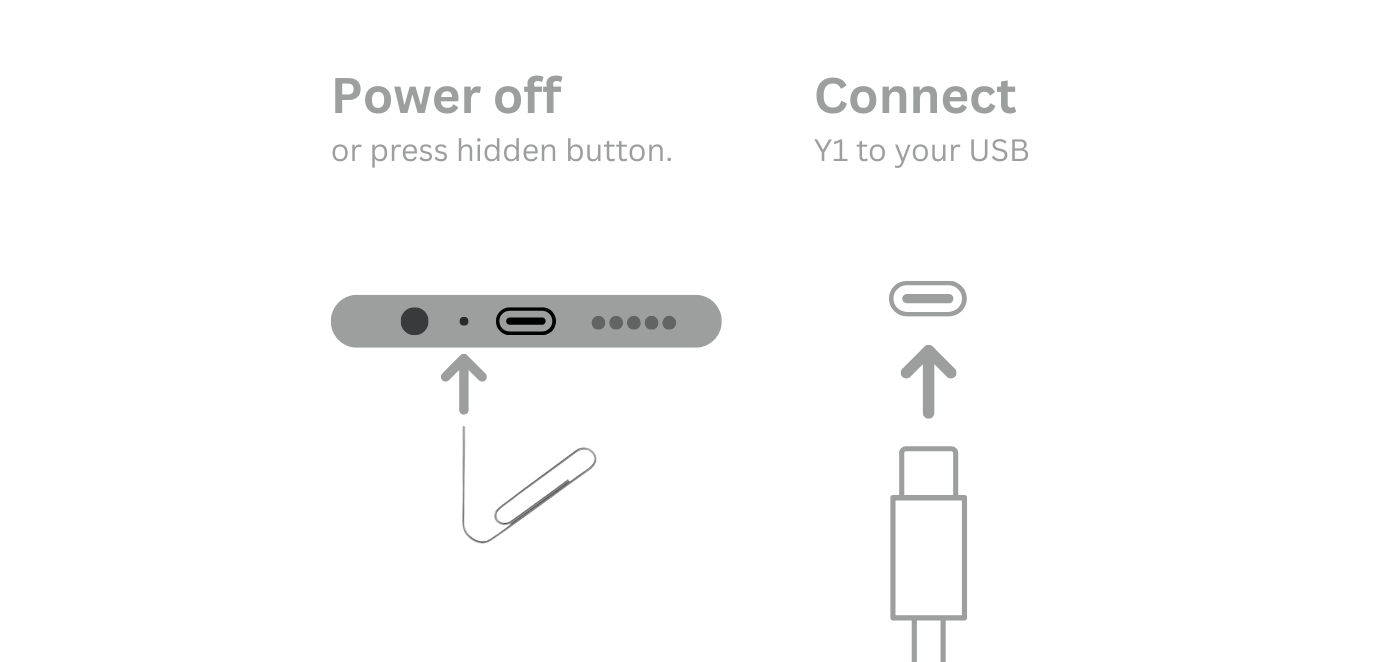
Install: click Pasang / Pulihkan, power the player fully off, and connect the USB cable only when Updater CE asks.
Finish: leave the player and cable alone until the success message, then disconnect and start the player.
Y1 players that shipped with Original Software before 2.0.0 need Device Type B. Everyone else keeps the default Type A.
Follow the live Updater CE prompt for your model.
Going back to Original Software
Custom software is reversible. In Updater CE, choose your model, select Perisian Asal, pick a stable release, then run Pasang / Pulihkan the same way. There is nothing to delete by hand.
Open the guide for your model and the software you chose.
Innioasis Y1
Software for Y1:
Innioasis Y2
Software for Y2:
Alat mana yang patut saya gunakan?
This guide uses Innioasis Updater 2.5.1, also called Updater CE. It keeps your songs, videos, and Bluetooth pairings safe. It tells you when updates are ready. The Innioasis Universal Flash Tool wipes your player and needs manual steps. Compare the tools →
Windows won't launch the app? Smart App Control workaround
Windows Defender SmartScreen or Smart App Control can block newly downloaded community applications before signature reputations propagate. Turning Smart App Control off allows Updater CE to open and run normally.
Buka tetapan on your Windows PC (press Win + I).
klik Privacy & security in the left sidebar, then click Windows Security.
klik App & browser control.
Under Smart App Control, click Smart App Control settings.
Set the toggle to Off to allow Updater CE to launch.
Downloaded via Edge? If Edge blocks the download itself, click the More options button (…) → Keep → Show more → Keep anyway.
Re-enabling Smart App Control later: When you want to turn Smart App Control back on, you can re-enable it via the Windows Registry under HKEY_LOCAL_MACHINE\SYSTEM\CurrentControlSet\Control\CI\Policy by setting VerifiedAndReputablePolicyState kepada 1 (On) or 2 (Evaluation Mode) and restarting.
Windows won't launch the app? How to turn off Smart App Control
Windows Defender SmartScreen or Smart App Control can block newly downloaded community applications before signature reputations propagate. Turning Smart App Control off allows Updater CE to open and run normally.
Buka tetapan on your Windows PC (press Win + I).
klik Privacy & security in the left sidebar, then click Windows Security.
klik App & browser control.
Under Smart App Control, click Smart App Control settings.
Set the toggle to Off to allow Updater CE to launch.
Blocked by Edge? If Microsoft Edge blocks the download itself, click the More options button (…) → Keep → Show more → Keep anyway.
Re-enabling Smart App Control later: When you want to turn Smart App Control back on, you can re-enable it via the Windows Registry under HKEY_LOCAL_MACHINE\SYSTEM\CurrentControlSet\Control\CI\Policy by setting VerifiedAndReputablePolicyState kepada 1 (On) or 2 (Evaluation Mode) and restarting.