Better-Y · Innioasis Y1
Install Better-Y on a Y1.
Better-Y is an enhanced stock experience for the Innioasis Y1 created by Leska1337. Select Y1 before choosing it to install model-matched packages.
Install guide for your computer
Install Better-Y on your Y1 with your computer
Pick the guide for the computer you are using. Every version has the platform setup, Updater CE steps and the way back to stock.
Install it
- Open Innioasis Updater CE on your computer (if you don't have it yet, Get Updater CE). Select Y1 in Device Model.
- Choose Better-Y in Software (or launch with Get this in Updater CE).
- Select a release and click Install / Restore.
- Power off and connect the Y1 only when Updater prompts you.
- Use Y1 Original Software for the restore path.
Keep the connection still
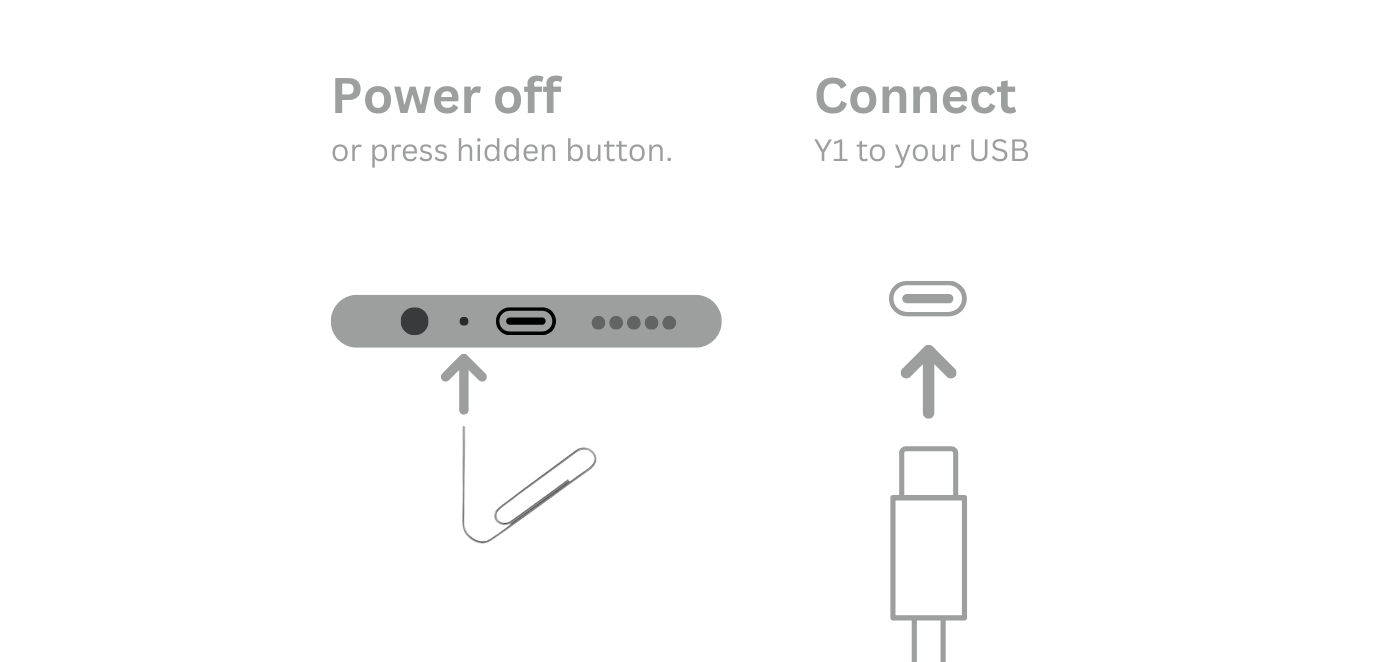
Leave the player still while the flashing completes. When Updater confirms success, unplug the player and power it on.
Better-Y shortcuts and tips
- Jump to Now Playing — Double-press the Play/Pause button from any screen or menu to instantly return to playback.
- Emergency reboot — If the player ever becomes unresponsive, hold the top and bottom buttons together to trigger a clean hardware reboot.
- Alphabetical scroll — Spin the click wheel along the edge to activate the alphabetical fast-index bar on long track lists.
- Interactive Now Playing icons — Tap the on-screen icons for Like, Shuffle, Repeat (One/All), Lyrics, A-B Loop, Queue, Bookmark, Speed, and Sleep timer.
- Tag splitting — Separate multiple artists with commas (,) or semicolons (;) to have tracks appear under each artist individually. Multi-genre tags split with commas, semicolons, or slashes.